





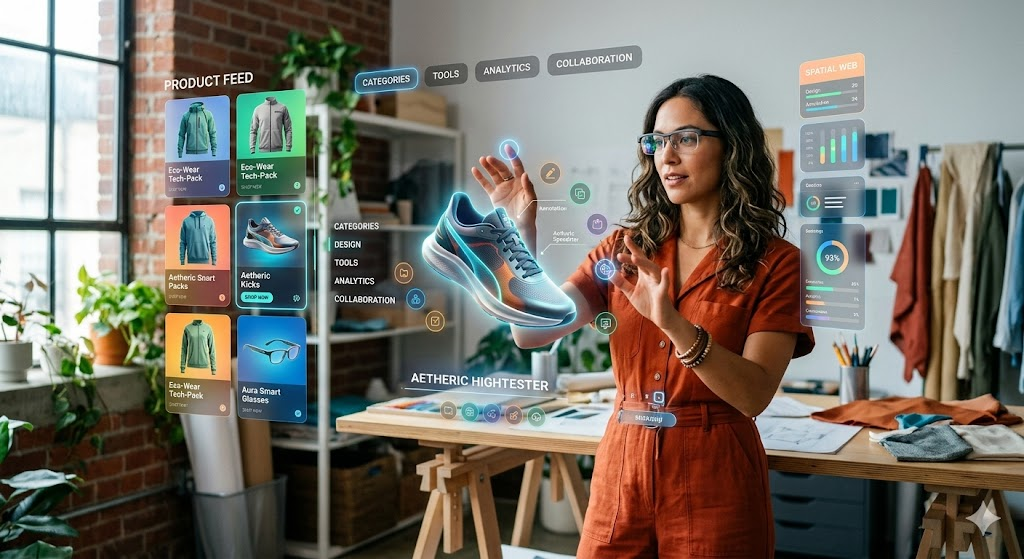
For over three decades, web design has been fundamentally flat. We have mastered the art of arranging text, grids, and images within rigid, 2D rectangular boxes—first for desktop monitors, and later for mobile screens. Responsive design was our solution to making content stretch and stack across varying screen sizes.
But the canvas of the web is expanding beyond the glass screen. With the commercial rise of spatial computing devices, mixed reality headsets, and lightweight smart glasses, the internet is entering three dimensions. Driven by the WebXR API, developers can now build fully immersive, spatial web experiences that run natively inside standard web browsers without requiring users to download heavy, gatekept native app files.
What is WebXR and the Spatial Web?
The Spatial Web refers to an evolving internet ecosystem where digital information is woven directly into the physical environment around us. At the heart of this architectural shift is WebXR, a unified browser standard that grants web developers access to the tracking, sensing, and rendering capabilities of virtual reality (VR) and augmented reality (AR) hardware.
[Traditional Web] -> HTML/CSS Grid -> Rendered inside a 2D Browser Window -> Screen Bound
[Spatial WebXR]    -> WebGL/Three.js -> Rendered in 3D Coordinate Space  -> Environmental
The defining advantage of WebXR is zero-friction accessibility. In a traditional application model, experiencing a spatial product demo requires a user to navigate to an app store, download a heavy multi-gigabyte application, agree to hardware permissions, and launch it.
With WebXR, a user simply clicks a standard link or scans a QR code while browsing on their mobile device or headset. The browser instantly activates the spatial environment, allowing them to place a life-sized 3D object right onto their physical desktop or walk inside a virtual storefront.
From Grids to Coordinates: The Core Pillars of Spatial UX
Designing for the spatial web requires developers to unlearn many traditional responsive layout techniques and adapt to an entirely new set of environmental constraints.
- Z-Axis Hierarchy (Depth): Traditional web layout relies on horizontal and vertical alignments (X and Y axes). Spatial design introduces depth (the Z-axis). Elements are no longer positioned just “top-left” or “centered”—they are positioned closer to or further away from the user’s physical field of view to establish visual priority.
- Gaze and Gesture Interaction: Mouse clicks and finger taps are replaced by gaze tracking, spatial voice commands, and physical hand gestures (like pinching, swiping, or grabbing in mid-air). Interactive elements must have larger hitboxes to accommodate natural human hand movements.
- Spatial Audio Integration: Sounds must be directional and tethered to specific 3D coordinate nodes. If a floating promotional video is positioned to the left of the user’s field of vision, the audio must realistically project into their left ear, dynamically shifting as they turn their head.
Real-World Applications Transforming E-Commerce and Enterprise
WebXR isn’t a speculative technology built just for gaming; it is driving massive utility across commercial sectors, particularly in retail and corporate training.
How Industries Are Exploiting the 3D Web:
- Frictionless “Try Before You Buy” Retail: E-commerce storefronts are using WebXR to let buyers instantly project life-sized furniture into their actual living rooms or virtually preview sunglasses on their face, directly from a mobile checkout page.
- Interactive Educational Portals: Architecture and medical websites are abandoning flat image galleries in favor of fully rotatable, explorable 3D blueprints and anatomical structures that students can pull apart in mid-air using a browser.
- Virtual Real Estate and Event Venues: Hospitality and commercial real estate platforms are building high-fidelity, interactive browser-based tours, allowing prospective buyers to walk through physical properties from anywhere in the world.
The Spatial Tech Stack: How to Build for the 3D Web
Developers looking to transition into spatial web design don’t have to start from scratch. The modern WebXR ecosystem is built on top of familiar JavaScript logic and rendering libraries.
To build an interactive, spatial web portal, developers combine standard frontends with a high-performance 3D pipeline:
- [ ] The Foundation (WebXR API): Handles the low-level hardware connection, device orientation, camera tracking, and sensor data collection within the browser.
- [ ] The Render Engine (Three.js / Babylon.js): The heavy-lifting JavaScript libraries used to create cameras, light sources, materials, and geometric shapes inside a 3D canvas.
- [ ] The Declarative Layer (A-Frame / React Three Fiber): High-level frameworks that wrap complex 3D math into simple, reusable HTML-like tags, allowing developers to spin up a 3D scene using familiar web components.
The image is created by AI.


Leave a comment